A Guide to Substack’s Recipe Embed Feature
And the automatic migration tool I built
Last updated: February 8, 2025
•
Alex Hollender
Summary
Last week, Substack introduced a recipe embed feature for posts. For anyone who publishes and/or reads recipes on Substack, this is a big improvement. Here is an example of how it looks in a published post: Cardamom Brown Butter Chocolate Chip Cookies. This posts covers the benefits of the new feature. Also, I’ve built a tool that automatically migrates plain-text recipes into Substack’s new structured format. If you want help migrating your content, check out this demo video and reach out to me: alex@recipe.site
The Feature
The official Substack article about the feature is here. You can add a recipe to your post by opening the More menu and selecting Recipe:
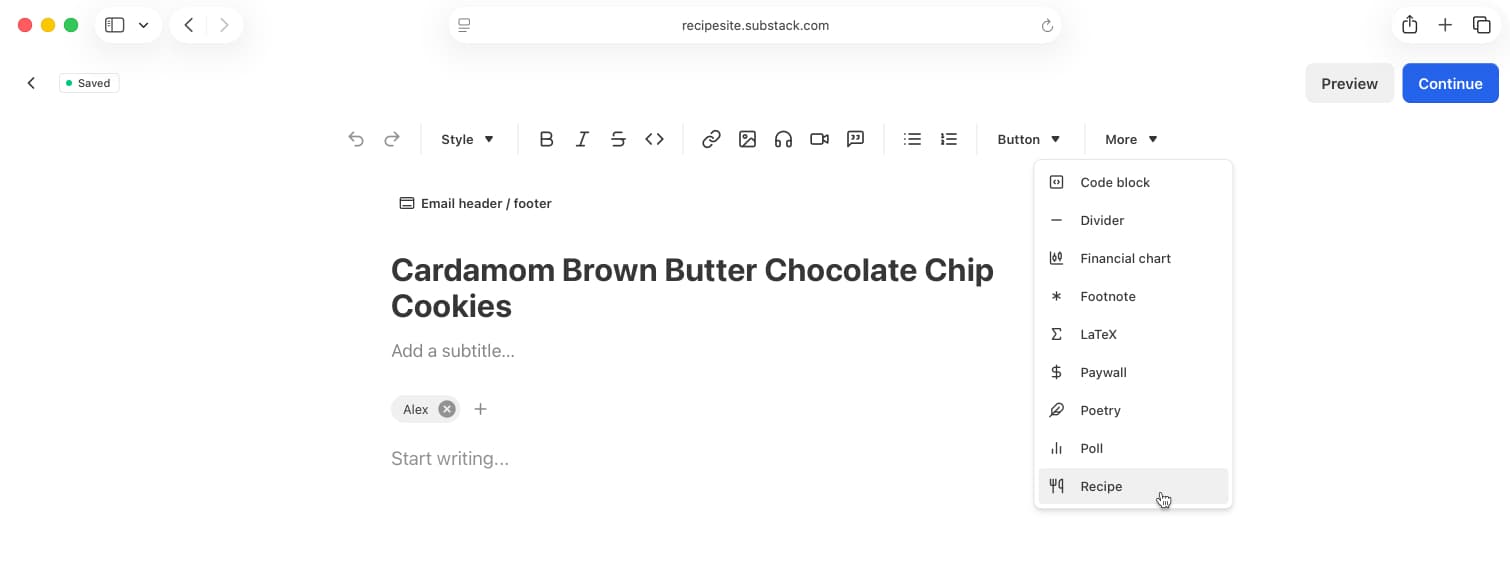
In case you didn’t see their email, they explain:
Recipe embeds are now available in beta on Substack — a clean, structured way to format recipes inside a post so subscribers can easily follow along and save for later. Recipe embeds automatically generate the proper metadata so search engines can index and surface your recipe, helping new readers discover your Substack.
If you’re posting a recipe soon, try formatting it with a recipe embed. We’re excited to keep improving this feature so reply with feedback on how we can make it even better. We can’t wait to see what you’re cooking up.
For now, the feature is fairly straightforward/simple—ingredients, instructions, cook time, prep time, serving size, and some tagging (cuisine, diet, etc.). A few things that are not yet supported, which I’m guessing people will want:
- Ingredient and instruction groups (e.g. "Dry Ingredients", "For the Dressing", "Prep", etc.)
- Adding images or videos to certain steps of the recipe
- Formatting recipe ingredient and instruction text (e.g. links, bold, italic, etc.)
- The Substack website/app not falling asleep when you’re on a recipe page
The nice thing is, with the current foundation these features will be fairly easy for them to make. More complex features—like scaling, unit conversions, inline ingredient referencing, timers, and more—will require some re-architecting, but are totally doable as well. And this highlights the general principle/benefit behind structured data: you do some upfront work to structure your recipe data, and then Substack (or any platform), can continue to build all sorts of features that take advantage of the fact that the data is structured. At a high-level, it’s basically the benefit of having an organized system. It takes time/effort to come up with a system and organize everything in the first place, but once you’re organized things are generally more efficient, etc.
Based on my experience building our recipe editor and CMS, I’m a big supporter of structured data, so I see this as a huge step forward for Substack. It will hopefully lead to ongoing (and compounding) improvements for both creators and readers.
Benefits of Structured Data
As they mention in the announcement, there are basically two main benefits:
- Recipes have a better layout (both in the email version and website version of posts), which makes them easier for people to follow.
- Google (and other search engines) can now display your recipes as rich results—the cards with cook times, ratings, ingredients, etc. that appear in search results*. Studies show these rich results get 25-75% higher click-through rates than regular search results (this article provides more detail about how that works and why it matters).
Currently, if someone searches for "[your name] [your recipe name]" on Google, your recipe will probably be one of the first results. The situation to consider here is people doing more generic searches, like "cardamom bun recipe". In those cases, only recipes with proper structured data will appear at the top of the search results page, formatted nicely as recipe cards (which are the ones that studies show get 25-75% higher click-through rates than regular search results).
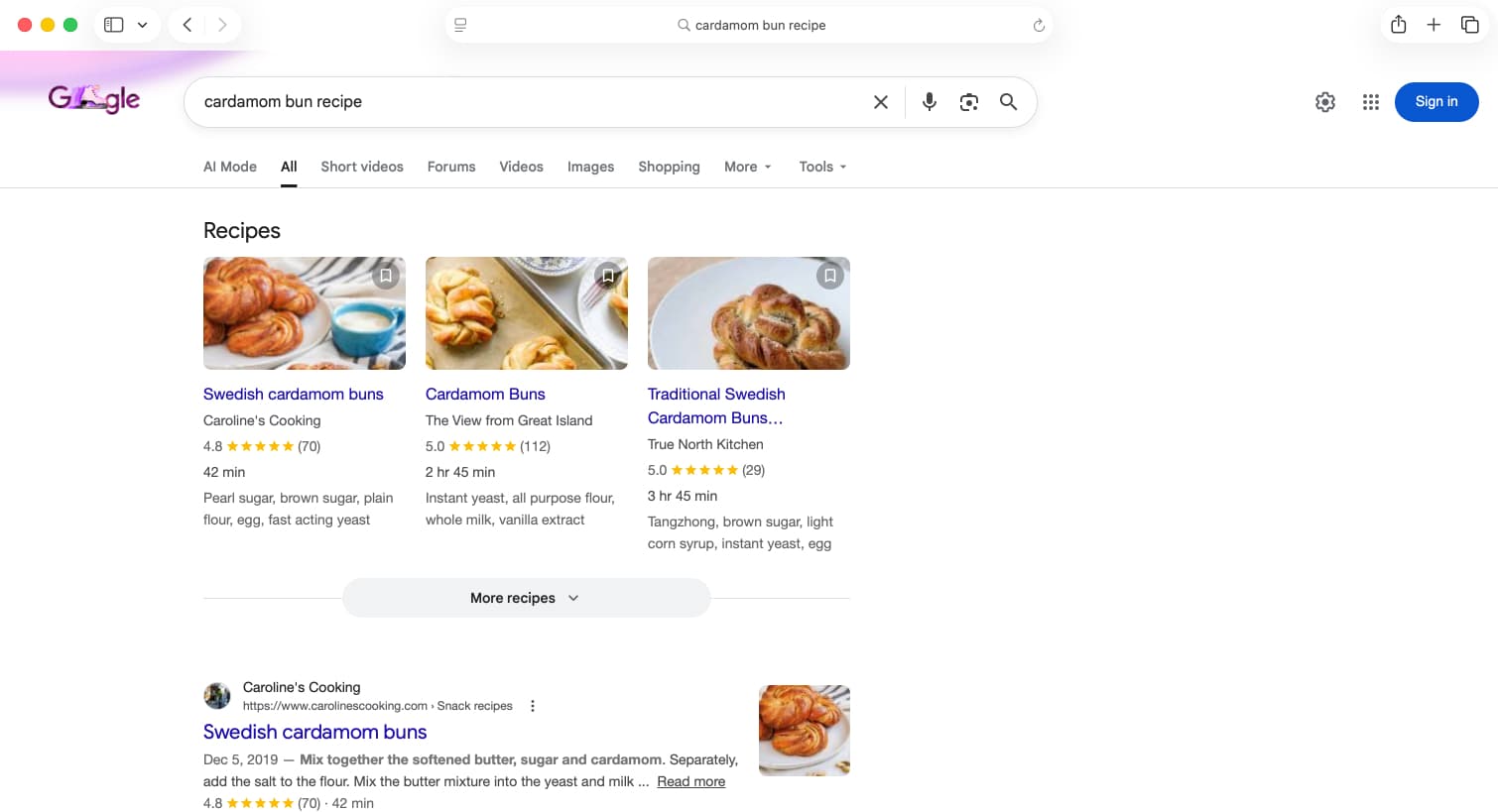
In this thread someone asks: "Curious if recipes will surface with SEO if they’re behind a paywall though?". The answer is yes, paywalled recipes will still get the same SEO benefits. For example, if you go to a paywalled recipe on NYT Cooking, right-click on the page and select View Page Source, and search for ld+json, you can see the schema markup that is available to Google and other search engines (even though you can’t see the recipe itself on the webpage).
*A note on the current implementation: Substack is currently inserting the schema on the client side, rather than on the server side. There are some downsides to this approach. See footnotes for more details.
Migration Tool
Because I think this is a great feature, and want to find ways to work with Substack creators, I spent some time yesterday exploring how I might use some of the recipe parsing technology I’ve built in order to help people easily migrate their existing recipes on Substack into the new structured recipe embeds. Below is a video showing what I’ve built so far. If you’re a Substack creator and want help migrating your recipes, please feel free to reach out: alex@recipe.site
Footnotes
While Google officially supports schema markup added via JavaScript on the client side, numerous studies have shown that schema markup added on the server side performs better. The main difference that has been observed is the time it takes for Google to index new pages[1][2][3]. What this means in practice is: if you publish a new recipe, it might take a week or longer for Google to index it as a recipe and start showing it as a recipe card in search results. Also, according to Martin Splitt, one of Google’s SEO specialists: "Client-side implementations generally work. Keep in mind, though, that server-side implementations tend to be more robust.".[4]
Project updates
Every few months we send an email announcing new features, future plans, etc.